|
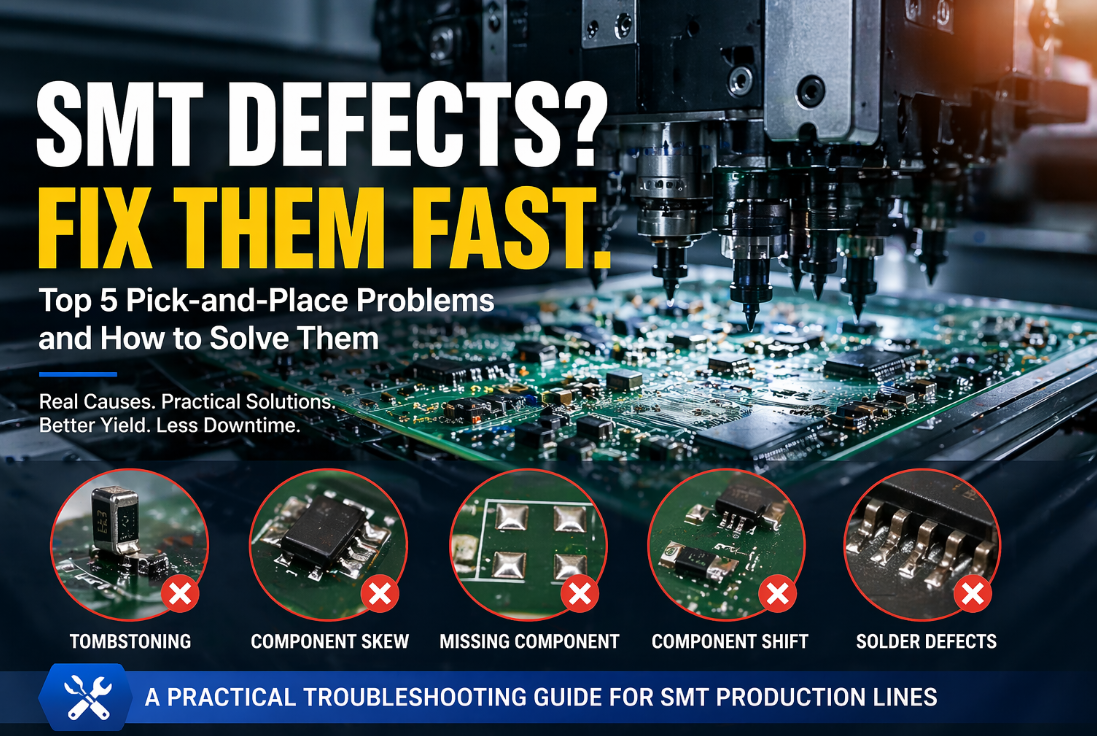
No matter how advanced your pick-and-place machine is, defects will eventually appear. Tombstoning, missing components, skewed placements, and insufficient solder joints after reflow are the daily headaches of SMT production managers. The frustration is compounded by the fact that the root cause could be anywhere: the stencil printer, the placement machine, the feeders, the nozzles, or even the PCB itself. Too often, engineers chase symptoms rather than causes. This article provides a systematic, practical guide to diagnosing and resolving the most common pick-and-place-related defects. Based on real-world case studies from contract manufacturers and high-volume lines, we will walk through each defect type, its probable causes, and step-by-step corrective actions. By the end, you will have a troubleshooting framework that reduces downtime and improves first-pass yield. Introduction to SMT Defect Troubleshooting Before diving into specific defects, it is essential to adopt a disciplined troubleshooting methodology. Randomly changing parameters without understanding the root cause often makes things worse. Follow this sequence: 1.Isolate the defect – Is it isolated to one component type, one feeder lane, one nozzle, or one PCB location? 2.Collect data – Use the pick-and-place machine’s log files (pick rates, vision results, placement offsets). 3.Inspect physically – Check the feeder, nozzle, and PCB pad condition. 4.Test one change at a time – Change only one variable, run 50-100 boards, and measure the defect rate change. 5.Document – Record the solution so it can be applied to similar issues in the future. Now, let us examine the most common defects.
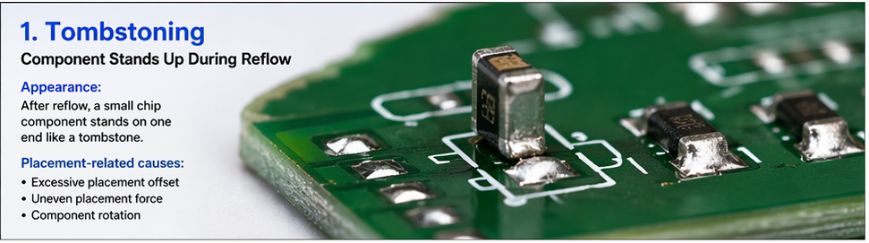
Defect #1: Tombstoning (Component Stands Up During Reflow) Appearance: After reflow, a small chip component (typically 0402, 0603, or 0805 resistor/capacitor) stands on one end like a tombstone. Why it happens: Uneven wetting forces during solder reflow. One pad’s solder paste melts and wets the component end before the other pad, pulling the component upright. The placement machine is not always the culprit, but it can be a major contributor. Placement-related causes:
Non-placement causes (check these first):
Step-by-step troubleshooting for tombstoning:
Target specification: For 0603 components and larger, placement offset should be <0.1mm. For 0402 and smaller, <0.05mm.
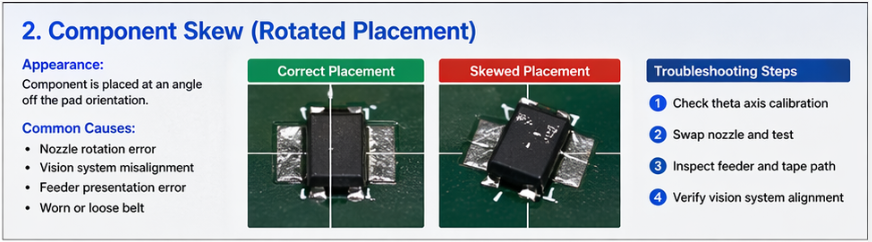
Defect #2: Component Skew (Rotated Placement) Appearance: Component is placed at an angle (e.g., 10-30 degrees off the pad orientation). Sometimes self-corrects during reflow; sometimes causes open or short circuits. Primary causes within the pick-and-place machine:
Troubleshooting sequence: 1.Check if skew is consistent across all components – If yes, likely a machine-wide theta calibration issue. Run calibration routine. 2.Check if skew is isolated to one nozzle – Swap the nozzle to another spindle. If the skew follows the nozzle, replace that nozzle. If it stays on the same spindle, the spindle’s theta motor or encoder may be faulty. 3.Check if skew is isolated to one feeder lane – Inspect the feeder for worn tape guides or a bent cover tape peel plate. Replace feeder. 4.Verify vision system – Run a component through the vision camera and manually check if the measured rotation matches the physical component. Use a calibration glass. Quick fix: If skew is minor (<5 degrees) and consistent, you can apply a compensating rotation offset in the placement program. However, this is a band-aid – find and fix the root cause.
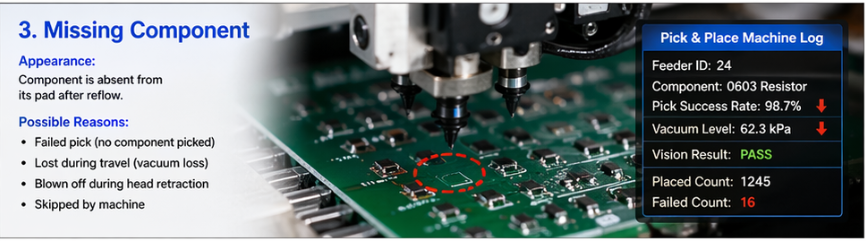
Defect #3: Missing Component (Component Not Placed) Appearance: After reflow, a component is absent from its pad. Sometimes the component is found elsewhere on the board or inside the machine. Causes: Failed pick – Nozzle did not pick the component from the feeder. Lost during travel – Component was picked but fell off before placement (vacuum loss). Blown off – Component was placed but then blown away by air blast during head retraction (common with very small, light components). Skipped by machine – Machine detected an error and intentionally skipped placement. Diagnostic approach: Check machine logs first. Most modern pick-and-place machines record:
If pick failed:
If component lost during travel:
If component blown off:
Prevention: Implement a nozzle cleaning schedule (ultrasonic cleaning every 8-12 operating hours for high-volume lines). Replace nozzles after 500,000 picks or at first sign of wear.
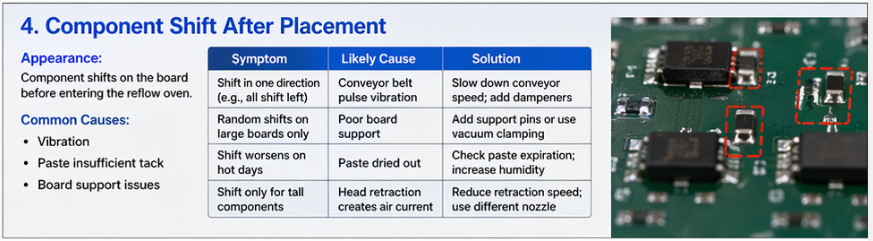
Defect #4: Component Shift After Placement (Before Reflow) Appearance: Component is correctly placed but then shifts before entering the reflow oven. This is often discovered by post-placement inspection or AOI before reflow. Causes:
Troubleshooting:
Quick test: Place a board, then gently tap the edge of the PCB with a finger. If components move, your paste tack is insufficient – replace paste or adjust paste conditioning.
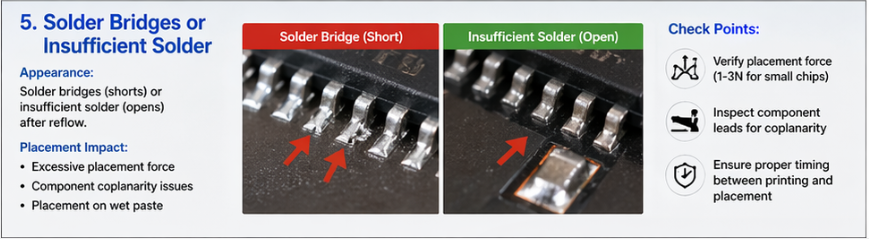
Defect #5: Solder Bridges or Insufficient Solder Appearance: After reflow, adjacent pads are connected by a solder bridge (short circuit), or a pad has insufficient solder (open circuit). While often blamed on stencil printing, placement can be a hidden contributor. How placement affects solder joints:
Diagnosis:
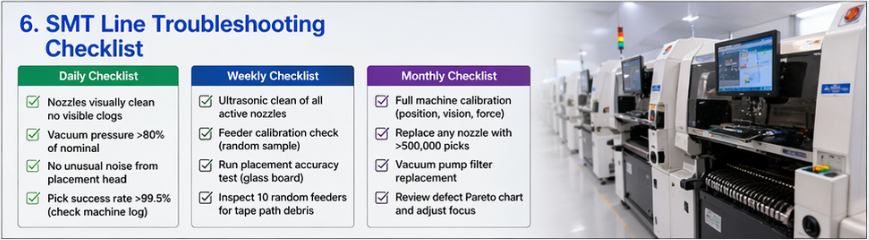
Building a Troubleshooting Checklist for Your Line Print this checklist and post it near your SMT line: Daily checklist:
Weekly checklist:
Monthly checklist:
Conclusion Pick-and-place defects are inevitable, but they are also solvable. The key is systematic troubleshooting: isolate the defect, collect data, test one change at a time, and document your solutions. Most placement-related defects trace back to three root causes: worn nozzles, misaligned feeders, or outdated calibration. By implementing a disciplined maintenance schedule and using your machine’s data logs, you can reduce tombstoning, skew, and missing components by 50-80% without buying new equipment. Start with the checklist above – and remember, the best troubleshooting tool is not a software patch but a clean nozzle and a well-maintained feeder. |
Troubleshooting Common Pick-and-Place Defects – A Practical Guide for SMT Engineers
22 apr 2026 HIETON